Digital Visitor Display

Turn your reception screen into a better welcome.

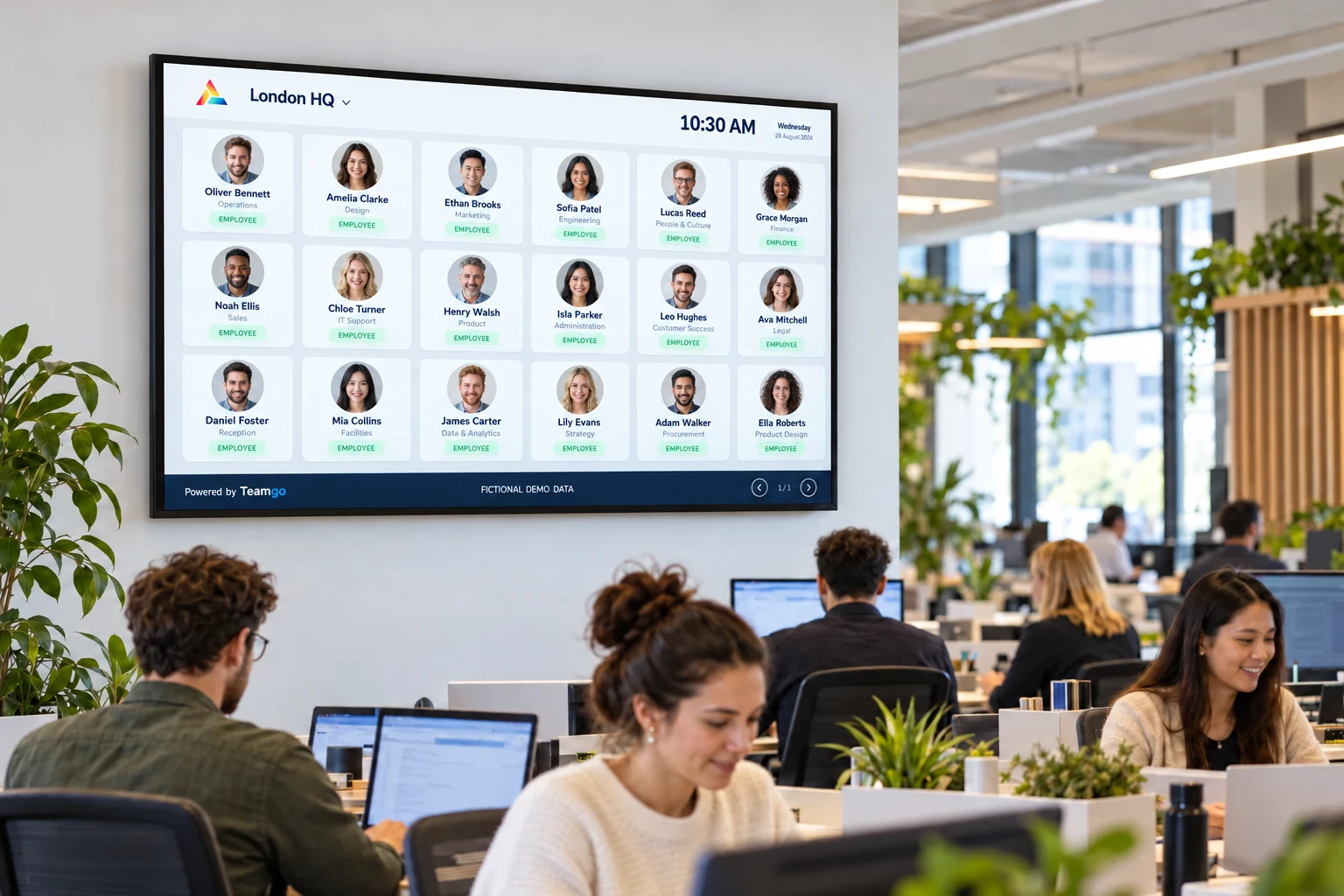
Welcome guests, share workplace messages and keep visitor information up to date on a branded display. Connected to Teamgo, so your reception team has one less thing to manage.
See how it works ↓

Wall-mounted London HQ visitor display above an open-plan office. Both pages show fictional people and demo information.

A welcoming reception. Without another list to update.

Make your first impression count

Turn a reception screen into a welcoming, branded display that reflects your organisation.

Keep information current

Visitor information updates as people sign in and out through Teamgo, without a separate list to maintain.

Put useful messages in view

Share welcome messages, workplace announcements and safety notices alongside visitor information.

Choose what people can see

Configure the information shown to suit your reception area and your organisation’s privacy policies.

Give reception one less task

Replace printed visitor lists and manual board updates with information from your existing Teamgo platform.

Bring more entrances together

Use multiple displays across reception areas, buildings or locations as your workplace grows.

How Digital Visitor Display works

London HQ
10:30 amThursday
Oliver BennettOperationsEmployee
Amelia ClarkeDesignEmployee
Ethan BrooksMarketingEmployee
Sofia PatelEngineeringEmployee
Lucas ReedPeople & CultureEmployee
Grace MorganFinanceEmployee
Noah EllisSalesEmployee
Chloe TurnerIT SupportEmployee
Henry WalshSite visitVisitor
Isla ParkerSite visitVisitor
Leo HughesSite visitVisitor
Ava MitchellSite visitVisitor
Display options Show visitors onsite Show employees Show onsite employees only
Board layout
Appearance
  1. 01Choose what to showDecide which visitor information and workplace messages belong on your reception display.
  2. 02Make it your ownConfigure your branding and display preferences to suit your workplace.
  3. 03Connect your display to TeamgoUse live information from your Teamgo Visitor Management platform instead of maintaining a separate board.
  4. 04Let arrivals keep it currentAs visitors sign in and out, the display updates automatically. Share announcements and welcome messages alongside visitor information.

Explore Digital Visitor Display

Live Visitor Display

Display current visitor information in real time on reception screens.

Visitor Status

Display visitor arrival and attendance information automatically.

Meeting Information

Present meeting details to assist visitors upon arrival.

Reception Display

Create a professional digital display for reception areas.

Display Announcements

Share important information alongside visitor displays.

Company Branding

Customise displays with your organisation's branding and colours.

Explore all Digital Visitor Display capabilities

Feature availability varies by plan. Compare plans to confirm the capabilities you need.

  • ✓
    Live Visitor Display

    Display current visitor information in real time on reception screens.

  • ✓
    Visitor Status

    Display visitor arrival and attendance information automatically.

  • ✓
    Meeting Information

    Present meeting details to assist visitors upon arrival.

  • ✓
    Reception Display

    Create a professional digital display for reception areas.

  • ✓
    Display Announcements

    Share important information alongside visitor displays.

  • ✓
    Company Branding

    Customise displays with your organisation's branding and colours.

  • ✓
    Multi-screen Support

    Display visitor information across multiple reception screens.

Keep your reception in sync with every arrival.

A busy reception has enough to manage without keeping a visitor board up to date. Printed lists and manual updates create another task each time someone arrives, leaves or needs a message changed.

Digital Visitor Display brings live visitor information, welcome messages and workplace announcements onto a branded reception screen. It connects to Teamgo Visitor Management and updates as guests sign in and out, helping your reception stay informed without maintaining a separate list.

You decide what belongs on the screen. Configure the displayed information, branding and layout to suit your reception environment and your organisation’s privacy policies. Show useful workplace messages alongside visitor information, rather than treating your screen as another standalone system.

Start with your reception area, then use multiple displays across buildings or locations when you need them. As part of the Teamgo Workplace Management platform, Digital Visitor Display works alongside products including Visitor Management, Room Booking and Broadcast Messaging.

Digital Visitor Display is an optional addition to an active Teamgo subscription. Book a demo to see the display experience, or request a quote to discuss the number of displays and the setup that suits your workplace.

Pricing for Digital Visitor Display

Base subscription$25/month
Included3 visitor displays
Additional unitsvisitor displays $5 each/month

Add Digital Visitor Display to an active Teamgo subscription. Use the pricing panel to explore billing, included displays and additional display costs. For a rollout across multiple reception areas or locations, request a quote and tell us how many displays you need.

Add Digital Visitor Display to your workplace.

Add Digital Visitor Display to an active Teamgo subscription. Use the pricing panel to explore billing, included displays and additional display costs. For a rollout across multiple reception areas or locations, request a quote and tell us how many displays you need.

Compare Teamgo plans →

Your questions, answered

Do I need Teamgo Visitor Management?

Yes. Digital Visitor Display is an optional product for organisations with an active Teamgo subscription. It uses information from Teamgo Visitor Management to keep the display up to date.

Will someone need to update the visitor list manually?

The visitor information updates automatically as people sign in and out through Teamgo. Your team can configure the display without maintaining a separate visitor board or printed list.

Can we choose which visitor information appears?

Yes. You can configure the information shown to suit your reception environment and your organisation’s privacy policies. Review your display settings before placing a screen in a public area.

Can we show more than visitor information?

Yes. Use the display for welcome messages, workplace announcements and safety notices alongside visitor information, so the screen can support everyday reception communication.

Can the display match our branding?

Yes. Configure the branding, displayed information and layout preferences to suit your organisation and the way your reception operates.

Can we use displays at more than one entrance or location?

Yes. Multiple displays can be used across reception areas, buildings and locations. Tell our team about your rollout so we can help you plan the display configuration and pricing.

Can we use a screen we already have?

Tell our team about the screen and setup you plan to use. We can confirm a suitable configuration for your workplace before you commit to a rollout.

How do we see the display and get pricing?

Book a demo to see Digital Visitor Display in action. You can also use the pricing panel on this page or request a quote for your display requirements. An active Teamgo subscription is required.

A more welcoming reception

See Digital Visitor Display in action.

Talk to our team about the right setup for your workplace.

Get started free with Teamgo

30-days free trial. No credit card required.